
Sigma Media Manager Pro WordPress Media Library with Folders, AI & Cloud
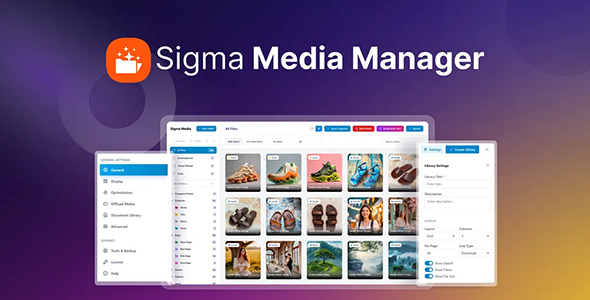
Sigma Media Manager is a WordPress media library plugin designed to make managing large collections of images, documents, and other media faster, cleaner, and more efficient. It adds a smarter organization system to the native WordPress media library, allowing you to create unlimited nested folders, sort files with drag-and-drop, and manage content without re-uploading files or changing existing URLs.
The plugin also brings cloud storage integration, AI-powered metadata generation, advanced search, image editing, and media access controls into the WordPress dashboard, giving website owners a centralized way to organize, optimize, store, and protect their media library.
Sigma Media Manager Pro Features
- Create unlimited nested folders to organize large WordPress media libraries efficiently.
- Use color-coded folder labels to identify and manage media collections at a glance.
- Move media into folders with intuitive drag-and-drop controls.
- Bulk move and rename multiple files without editing them individually.
- Switch between grid and list views for a more flexible media management experience.
- Adjust thumbnail sizes and control how many media items appear per page.
- Automatically organize media based on posts with Smart Organize.
- Offload WordPress media to Amazon S3, DigitalOcean Spaces, Google Cloud Storage, or Cloudflare R2.
- Automatically update media links when files are moved to cloud storage, helping prevent broken URLs and downtime.
- Scan for unused media before deleting files to help keep your library clean.
- Generate SEO-friendly image alt text in bulk using AI.
- Automatically create image captions with AI to reduce repetitive manual work.
- Generate descriptive file titles with AI across selected folders or the full media library.
- Auto-tag images based on their visual content for easier organization and discovery.
- Process only empty metadata fields or update metadata across an entire media library in bulk.
- Protect individual files with password-based access controls.
- Create expiring download links for controlled media sharing.
- Limit the number of times a protected file can be downloaded.
- Restrict folder access based on WordPress user roles.
- Find files quickly with advanced search, filters, taxonomies, and custom media tags.
- Filter media by file type, date, size, or folder for faster navigation.
- Edit images directly inside WordPress with a built-in photo editor.
- Extend the native WordPress Media Library so organized folders are available inside the standard media picker.
- Work with popular page-building workflows, including Elementor and Gutenberg.
- Manage and sort thousands of files in bulk without having to handle each item individually.
- Organize existing media without physically moving files on the server, helping preserve links and avoid unnecessary re-uploads.
READ BEFORE PURCHASE
◉ Before making purchase, please read our FAQ & Terms of Service.
◉ If you have any issues with the items, please visit Troubleshooting page first. You can read other helpful guides on Knowledge Base.
◉ If you haven’t found the answer to your question, please Contact Us.
◉ You can use the items on your own, your company, or client sites, but you’re not allowed to resell the items on your or other websites.
DOWNLOADED FILES
◉ Make sure you unzip the downloaded file before uploading to your site as it may contain other files which are not part of the theme or plugin. Unzip the package first, then upload the correct .zip file.
◉ All files are 100% free from viruses or malicious code. We purchased and downloaded from original developers. We don’t sell items downloaded from other sites.
◉ You get the same file as you purchase from official website. We just don’t offer additional services like developer’s support.
◉ We DON’T provide license key. All items are fully working without entering license key or purchase code. You can use on as many websites as you like.
SUPPORT
◉ Feel free to contact us if you have any questions or need help in installing the items. Our support team is available 24/7.
◉ Please note that we are not developers of the provided themes/plugins, so our technical support capabilities are limited. We don’t customize the items, fix developer bugs, etc.
◉ Check out the item documentation for setting up, configuration, or any other how-to questions. Most available online.
-
1.7.4
Version -
September 22, 2026
Updated -
Category
-
Brand
-
Scanned by Sophos® engine
DOWNLOAD
*Please subscribe in order to download
Become a Member
Unlock PREMIUM features and get
the BEST VERSION of your site!!
-
Access to all items
-
Latest updates
-
Unlimited websites
-
Instant download
More from this developer

One Accessibility Pro
Dark Reader Pro
Smart Admin Assistant Pro
Sigma Store Locator Pro
Launch Guard Pro
